과제 1: XSS Filtering Bypass
https://dreamhack.io/wargame/challenges/433
로그인 | Dreamhack
dreamhack.io
1. 소스코드 분석
#!/usr/bin/python3
from flask import Flask, request, render_template
from selenium import webdriver
from selenium.webdriver.chrome.service import Service
import urllib
import os

app = Flask(__name__)
app.secret_key = os.urandom(32)

try:
    FLAG = open("./flag.txt", "r").read()
except:
    FLAG = "[**FLAG**]"


def read_url(url, cookie={"name": "name", "value": "value"}):
    cookie.update({"domain": "127.0.0.1"})
    try:
        service = Service(executable_path="/chromedriver")
        options = webdriver.ChromeOptions()
        for _ in [
            "headless",
            "window-size=1920x1080",
            "disable-gpu",
            "no-sandbox",
            "disable-dev-shm-usage",
        ]:
            options.add_argument(_)
        driver = webdriver.Chrome(service=service, options=options)
        driver.implicitly_wait(3)
        driver.set_page_load_timeout(3)
        driver.get("http://127.0.0.1:8000/")
        driver.add_cookie(cookie)
        driver.get(url)
    except Exception as e:
        driver.quit()
        # return str(e)
        return False
    driver.quit()
    return True


def check_xss(param, cookie={"name": "name", "value": "value"}):
    url = f"http://127.0.0.1:8000/vuln?param={urllib.parse.quote(param)}"
    return read_url(url, cookie)

def xss_filter(text):
    _filter = ["script", "on", "javascript:"]
    for f in _filter:
        if f in text.lower():
            text = text.replace(f, "")
    return text

@app.route("/")
def index():
    return render_template("index.html")


@app.route("/vuln")
def vuln():
    param = request.args.get("param", "")
    param = xss_filter(param)
    return param


@app.route("/flag", methods=["GET", "POST"])
def flag():
    if request.method == "GET":
        return render_template("flag.html")
    elif request.method == "POST":
        param = request.form.get("param")
        if not check_xss(param, {"name": "flag", "value": FLAG.strip()}):
            return '<script>alert("wrong??");history.go(-1);</script>'

        return '<script>alert("good");history.go(-1);</script>'


memo_text = ""


@app.route("/memo")
def memo():
    global memo_text
    text = request.args.get("memo", "")
    memo_text += text + "\n"
    return render_template("memo.html", memo=memo_text)


app.run(host="0.0.0.0", port=8000)- 소스코드를 살펴보면 지난번 풀었던 xss-1문제와 굉장히 유사함을 확인할 수 있다.
- 다른점이라고 하면 xss_filter()라는 함수가 추가되어 들어온 입력에서 script, on, javascript문자를 지워버린다는것 정도이다
2. 페이지 분석
- 지난번과 같이 Reflected XSS가 가능한지 확인해보자

- 확인해본 결과 xss_filter()함수가 정상적으로 작동했는지 script문자열이 사라져 명령어 로써가 아닌 그냥 문자열로만 출력되는것을 확인할 수 있다.
- 그렇다면 xss_filter()함수를 우회할 수 있는방법을 찾는다면 지난번 payload와 동일한 payload로 exploit할 수 있을것이라 예상해본다.
- 우리가 사용해야하는 script가 필터에 걸려 사라진다면 script 사이에다가 filter에 걸리는 문자열을 하나 추가한다면 그 문자열이 사라지면서 script가 출력될것이라 예상해볼 수 있다.
ex) <scripont>

- 다음과 같이 예상이 적중했음을 알 수 있다.
3. Payload 작성
<scripont>location.href='/memo?memo='+document.cookie</scripont>- 고로 다음과 같은 payload를 작성해볼 수 있다.


- 하지만 어째서인지 flag가 뜨지 않음을 확인할 수 있다.
- 다시한번 우리가 작성한 payload를 확인해보도록 하자
<scripont>location.href='/memo?memo='+document.cookie</scripont>- 다시한번 확인해보니 location에서 filter에 걸리는 단어인 on이 포함되어있었다.
4. Payload 수정
- 고로 이 payload를 수정한다면
<scripont>locatioonn.href='/memo?memo='+document.cookie</scripont>- 다음과같이 수정할 수 있다.
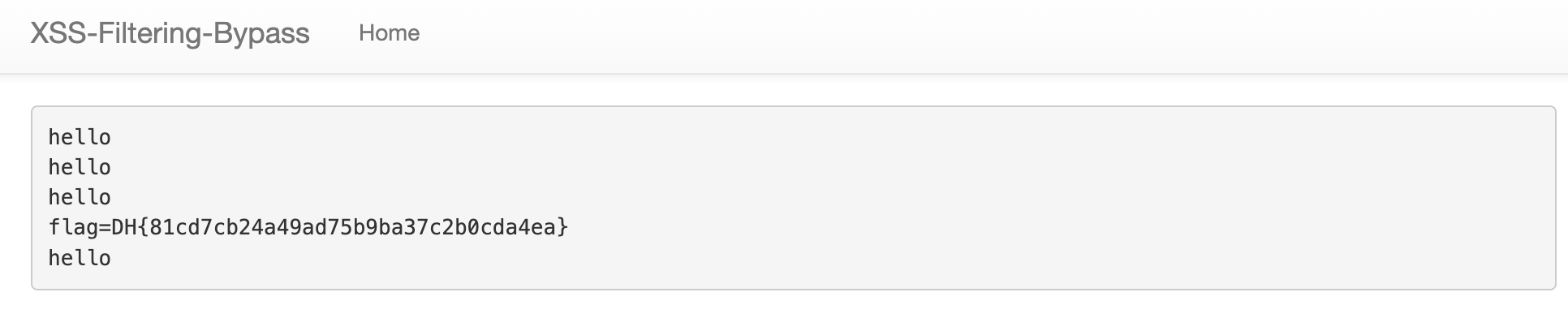
- 보이는바와같이 정상적으로 exploit되었다.
과제 2: DOM XSS
https://dreamhack.io/wargame/challenges/438
로그인 | Dreamhack
dreamhack.io
1. 소스코드 분석
#!/usr/bin/python3
from flask import Flask, request, render_template
from selenium import webdriver
from selenium.webdriver.chrome.service import Service
import urllib
import os

app = Flask(__name__)
app.secret_key = os.urandom(32)
nonce = os.urandom(16).hex()

try:
    FLAG = open("./flag.txt", "r").read()
except:
    FLAG = "[**FLAG**]"


def read_url(url, cookie={"name": "name", "value": "value"}):
    cookie.update({"domain": "127.0.0.1"})
    try:
        service = Service(executable_path="/chromedriver")
        options = webdriver.ChromeOptions()
        for _ in [
            "headless",
            "window-size=1920x1080",
            "disable-gpu",
            "no-sandbox",
            "disable-dev-shm-usage",
        ]:
            options.add_argument(_)
        driver = webdriver.Chrome(service=service, options=options)
        driver.implicitly_wait(3)
        driver.set_page_load_timeout(3)
        driver.get("http://127.0.0.1:8000/")
        driver.add_cookie(cookie)
        driver.get(url)
    except Exception as e:
        driver.quit()
        # return str(e)
        return False
    driver.quit()
    return True


def check_xss(param, name, cookie={"name": "name", "value": "value"}):
    url = f"http://127.0.0.1:8000/vuln?param={urllib.parse.quote(param)}#{name}"
    return read_url(url, cookie)

@app.after_request
def add_header(response):
    global nonce
    response.headers['Content-Security-Policy'] = f"default-src 'self'; img-src https://dreamhack.io; style-src 'self' 'unsafe-inline'; script-src 'self' 'nonce-{nonce}' 'strict-dynamic'"
    nonce = os.urandom(16).hex()
    return response

@app.route("/")
def index():
    return render_template("index.html", nonce=nonce)


@app.route("/vuln")
def vuln():
    param = request.args.get("param", "")
    return render_template("vuln.html", nonce=nonce, param=param)


@app.route("/flag", methods=["GET", "POST"])
def flag():
    if request.method == "GET":
        return render_template("flag.html", nonce=nonce)
    elif request.method == "POST":
        param = request.form.get("param")
        name = request.form.get("name")
        if not check_xss(param, name, {"name": "flag", "value": FLAG.strip()}):
            return f'<script nonce={nonce}>alert("wrong??");history.go(-1);</script>'

        return f'<script nonce={nonce}>alert("good");history.go(-1);</script>'


memo_text = ""


@app.route("/memo")
def memo():
    global memo_text
    text = request.args.get("memo", "")
    memo_text += text + "\n"
    return render_template("memo.html", memo=memo_text, nonce=nonce)


app.run(host="0.0.0.0", port=8000)- 지난번 문제들과는 다르게 add_header()라는 함수가 추가되었고 그에따른 랜덤값을 저장하는 nonce 변수가 추가되었다.
- add_header()의 기능은 CSP의 nonce 기능을 불러오는데 이는 payload를 입력할때 nonce의 값을 정확히 입력하지 않는다면 script문을 그냥 문자열로만 받아들인다고 한다.
(제미나이가 알려줌) - 그렇다면 Reflected XSS가 작동하지 않는다는것을 예상해 볼 수 있고 기존과는 다른 방식을 살펴보아야할 것 같다.
- 여기서 한가지 살펴볼 점은 CSP 에 'strict-dynamic'기능이 들어가있다는 점이다
- stric-dynamic 기능이 있는경우 이미 인증된 스크립트가 만드는 코드는 nonce가 없어도 허가를 해준다는 특성이 있다.
- 고로 인증된 스크립트의 innerHTML에 payload를 입력한다면 flag를 얻을 수 있을것이다.
2. 페이지 분석
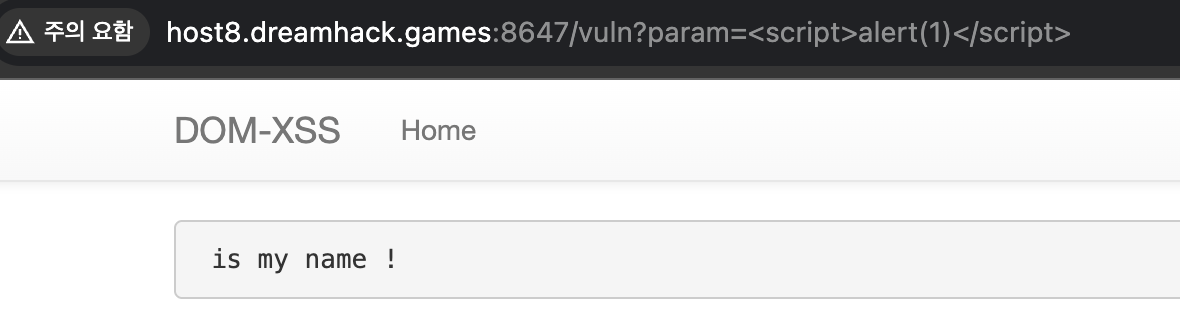

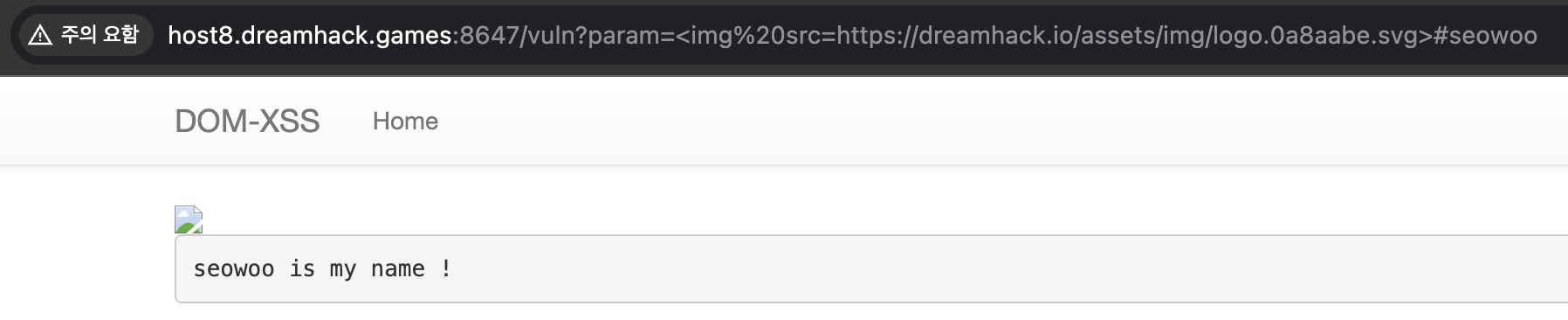
- /vuln 페이지를 살펴보면 평범한 Reflected XSS가 불가능함을 확인할 수 있다.
- 또한 #뒤 문자열을 수정하면 다음과같이 화면에 출력됨을 확인할 수 있다.
→ 그렇다면 #이 무엇을 의미하는지 살펴보자
URL이란? - Web 개발 학습하기 | MDN
하이퍼텍스트와 HTTP에서 URL 은 웹의 핵심 개념 중 하나입니다. URL은 웹에 게시된 리소스를 검색하기 위해 브라우저에서 사용하는 메커니즘입니다. URL은 Uniform Resource Locator의 약자입니다. URL은
developer.mozilla.org
- 요약하자면 HTML 내부 특정 위치(anchor)로 이동 하는 앵커역할을 하고 서버로 넘어가지 않고 브라우저에서만 남아있는 책갈피라고 생각하면 될 것 같다.
- 그럼 이를 어떻게 이용하면 flag를 얻을 수 있을지 생각해보자
3. HTML 소스코드 확인
{% extends "base.html" %}
{% block title %}Index{% endblock %}

{% block head %}
  {{ super() }}
  <style type="text/css">
    .important { color: #336699; }
  </style>
{% endblock %}

{% block content %}

  <script nonce={{ nonce }}>
    window.addEventListener("load", function() {
      var name_elem = document.getElementById("name");
      name_elem.innerHTML = `${location.hash.slice(1)} is my name !`;
    });
 </script>
  {{ param | safe }}
  <pre id="name"></pre>
{% endblock %}- /vuln페이지를 나타내는 html 코드이다.
- var name_elem = document.getElementById("name"); 을 보면 id가 name인 변수를 조작한다면 innerHTML을 조작할 수 있음을 알 수 있다.
- 또한 태그가 script이므로 바로 실행가능한 코드로 바뀐다는것을 확인할 수 있다.
4. 가설확인

- <script id=name></script>#alert(1)을 입력해보았지만 정상적으로 실행되지 않음을 확인할 수 있다.
- 아마도 name_elem.innerHTML = `${location.hash.slice(1)} is my name !`; 뒤에있는 is mt name! 이라는 문자열 때문에 alert(1) is my name! 이라는 입력이 들어가는 것 같다.

- 고로 alert(1) 뒤를 // 으로 주석처리 해준다면 정상적으로 명령이 실행되는것을 확인할 수 있다.
※ 어째서 id=name을 추가하면 name 변수를 조정할 수 있는지 궁금한 분들을 위해 간략한 설명을 남기자면
- "HTML 태그에 id를 붙이면, 자바스크립트에서 그 이름의 변수로 바로 쓸 수 있다." 라는 규칙이 javascript에 있다고 합니다.
5. Payload 입력
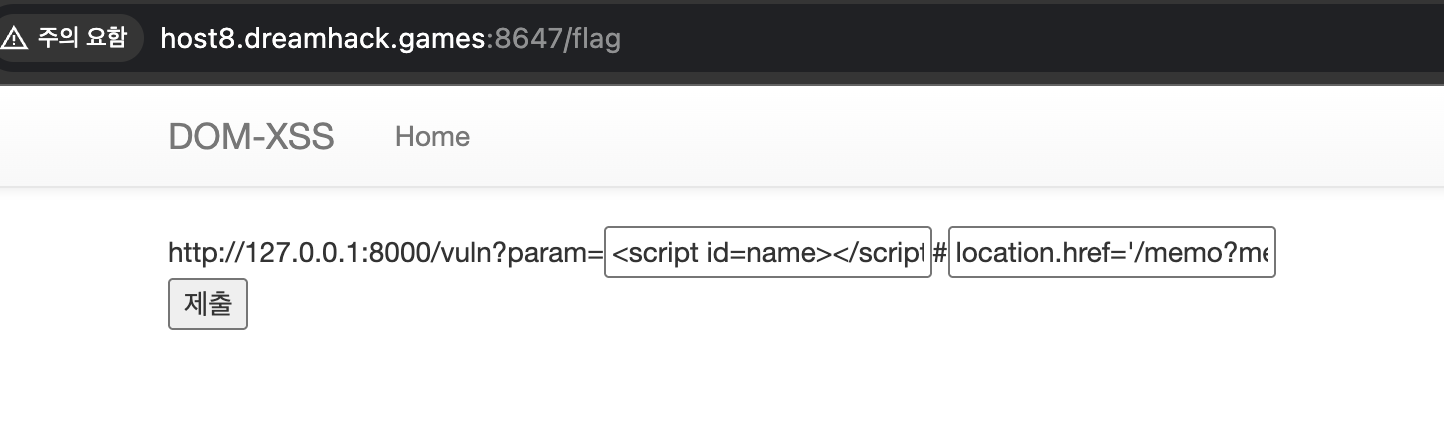
<script id=name></script>#location.href='/memo?memo='+document.cookie;//- 고로 다음과 같은 payload를 입력한다면 정상적으로 flag가 뜨는것을 확인할 수 있을것이다.
- 어쨰서 해당 payload가 생기는지 궁금하다면 xss-1 풀이를 참고하길 바란다

'워게임' 카테고리의 다른 글
| [시스템 해킹] bof1 write-up (0) | 2026.01.16 |
|---|---|
| math.c write-up (0) | 2026.01.16 |
| [웹 해킹] xss-1 write-up (0) | 2026.01.03 |
| ICEWALL web-hacking 스터디반 과제 정리 2 (0) | 2025.12.31 |
| ICEWALL web-hacking 스터디반 과제 정리 1 (0) | 2025.12.30 |